

Best Flight Price Tracker to Get the Cheapest Deals
Here's how to track your flights to get the best possible deal.

Here's how to track your flights to get the best possible deal.
Ever watched a fare drop the day after you bought a ticket and wished you had a do-over? Between dozens of airlines, shifting sale windows, and confusing fare rules, finding cheap flights can feel like a second job. Flight price trackers and airfare alerts have earned their place among the Best Apps for Travel by offering price alerts, fare prediction, price history, price comparison, and deal finder features that surface the best flight deals. This guide shows you how to use reliable fare tracker tools, set price notifications, watch ticket price drop, and scan fare calendars so you can find the lowest airfare fast.
Autopilot uses automatic flight credits to catch price drops for you, turning airline price tracking and airfare monitoring into savings without extra work, so you get refunds or credits when fares fall.

A flight price tracker is a digital tool that watches airfare for a route and gives you alerts when prices change. It acts like a price watch for flights, scanning airlines and booking sites on a set schedule and saving the data so you can see price history and trends. You pick routes, dates, cabin class, and other preferences, and the tracker sends price alerts by email or push notification when fares hit your target or fall sharply.
Trackers use public flight data, airline APIs, and results from meta search engines to collect fares without repeatedly searching from your browser. That prevents airlines from flagging high interest and raising prices after many manual searches. The software records fares over days or weeks, builds a price graph, and runs simple prediction logic to show likely low price windows and a booking window when fares tend to rise.
You save time and reduce guesswork. Instead of checking sites daily, you let the tracker monitor fares and notify you when a deal appears. The tool helps you spot cheap flight deals, understand the booking window, and take action when price predictions suggest fares will rise. Trackers also help compare offers across low-cost carriers and full-service airlines in one place.
Set a clear budget or target fare and enable alerts for that amount. Use a flexible date search to find cheaper travel windows and set filters for the maximum number of stops and total travel time. Run simultaneous tracking on multiple routes or nearby airports to widen your options. Watch fare history rather than single data points to avoid reacting to short-lived spikes. Do you have loyalty points or baggage rules to factor in?n Use them when comparing the final ticket cost.
Look for trackers that show historical price data, give push notification alerts, and do not steer you toward higher-priced partners. Some tools also offer price prediction or fare guarantee features that estimate whether fares will go up. Autopilot is one platform that emphasizes unbiased tracking and real-time notifications when fares drop or when a price is likely to rise.

Autopilot focuses on tracking fares after you complete a booking. Instead of guessing when to buy, Autopilot continuously monitors the exact flights you purchased and looks for lower published fares. When it finds one, the service secures airline credit for the difference so your itinerary, seat assignment, and cabin remain unchanged. How does that sound if you want savings without rebooking or extra hassle?
Autopilot runs automated price monitoring against live airline inventories and published fares for your specific record locator and fare class. Its algorithms compare ticketed fares to newly posted prices and identify qualifying price drops. Once a lower fare matches your booking details, Autopilot files the claim with the airline to recover the credit amount on your behalf. That process reduces the manual work of checking price alerts or airfare tracking tools daily.
You can import itineraries in three ways, including linking your Gmail for automatic flight import, forwarding confirmation emails, or entering booking details manually. Automatic email import keeps your travel and expense workflow tight, while manual entry gives complete control when needed. The system normalizes booking data, so price alerts, fare monitoring, and refund retrieval operate on exact matches to your ticket.
Autopilot is free to track flights. If it secures a credit, Autopilot takes a 25 percent commission on the amount recovered. There are no upfront fees and no subscription required for basic tracking, which turns fare recovery into a performance-based service rather than a gamble. That approach aligns incentives: you pay only when you get money back from the airline.
Autopilot currently supports American Airlines, Delta Air Lines, and United Airlines for most cabins except basic economy. It also supports award tickets for Pro subscribers, including those booked with miles. The product roadmap aims to expand carrier coverage and add more ticket classes over time. Want to track a premium cabin or business travel itinerary booked with miles? Pro feature sets cover those cases.
Beyond price recovery, Autopilot can monitor seat availability and move you to a preferred seat if it opens up under the same booking. That reduces the need to check seat maps or agonize over upgrades repeatedly. It can also capture credits for business travel spending and feed into corporate travel cost recovery when set up for company accounts.
Autopilot uses industry-standard encryption to protect flight and user data and undergoes annual security assessments. It supports personal and business travel use cases, allowing users to track flights for family members or colleagues by importing their itineraries. The platform is built to fit expense workflows while minimizing security friction for travel managers.
Most fare watchers focus on pre-booking price signals and speculative buy windows. Autopilot, by contrast, eliminates timing stress by watching your booked ticket and acting if airlines lower fares. That shifts the workload from daily airfare tracking and manual refund requests to a passive service that files claims and secures airline credit for you.
Do you fly premium cabins or book business class frequently? Will you need award ticket monitoring? How many itineraries per month should you connect to Gmail for automatic import? Answering these helps decide whether to use the free tracking tier or upgrade to Pro for award and advanced business features.
Autopilot works with exact booking details and fare classes to qualify credits, so keeping accurate confirmations helps. The tool handles airline claim paperwork and follow-up, saving time spent on customer service calls and complex refund policies. It also logs recovered credits so you can reconcile travel spend or export data for corporate expense systems.
Stop losing money on flights you've already booked. Autopilot automatically monitors your premium cabin and business travel for price drops, securing instant credits when airlines lower fares, while you focus on what matters most. For frequent flyers who book 2+ flights monthly, this isn't just convenience; it's money back in your pocket without lifting a finger. Join thousands of business travelers who've recovered hundreds on flights they thought were final purchases. Start earning automatic flight credits today.

Autopilot watches many signals that shape airfare. It tracks current price levels and short-term trends in the fare markets. It mines historical price patterns for the same route and travel dates to find repeatable cycles. It measures route demand from search volume, booking velocity, and seat inventory changes reported by carriers and global distribution systems. It flags the presence of low-cost airlines and competitor routes that compress fares.
It layers in seasonal effects such as holidays, school breaks, and significant events. It factors the booking window or days until departure, since prices often follow predictable curves as flights fill. The system also ingests promotions, published sale fares, schedule changes, and occasional operational data, such as cancellations and weather disruptions.
Autopilot combines time series forecasting with machine learning to make fare predictions. The pipeline builds features from price history, day of week, lead time, load factors, and route competitiveness. It trains models such as gradient boosting, neural networks, and probabilistic time series methods, then blends them in an ensemble to reduce single-model bias.
The engine produces probability scores for price directions and numeric forecasts for expected price ranges. It also generates confidence bands that widen when market signals are noisy. Models are validated against past booking outcomes and tuned to optimize metrics that matter to travelers, such as the accuracy of a buy now versus wait recommendation.
Autopilot pulls data from consolidated sources such as global distribution systems, airline direct feeds, online travel agencies, and its own user search logs and booking signals. It enriches those feeds with calendar event data and public information on routes and capacity. The system runs continuous monitoring to detect sudden fare drops or promotional sales and flags anomalies with automated alerts. Because airlines change fares quickly, Autopilot updates models on a rolling basis and refreshes price monitoring as often as the data allows
Predictions carry uncertainty, and Autopilot expresses that through probabilities and confidence intervals. Sudden promotions, unexpected demand spikes, or airline inventory moves can create forecast errors. The model applies anomaly detection to catch those cases early and will shorten the forecast horizon or widen confidence bands when volatility rises. Expect higher accuracy for stable routes and predictable seasons, and wider uncertainty for volatile routes or last-minute flights.
Autopilot learns from each search and booking. When users set a price alert or add a route to a watchlist, the system captures real-world responses and refines its models. It also uses outcome-based feedback, such as whether a recommended buy action actually saved money. The learning is continuous, and feature importance shifts when market structure changes, for example, when a new low-cost carrier launches a route or when airlines alter capacity.
Forecasts appear as price graphs, fare calendars, buy now or wait recommendations, and probability scores for price drops. Alerts notify you when predicted conditions change or when a fare moves outside expected bands. You can set thresholds to receive price drop alerts, create a watchlist across multiple routes, or compare forecasts across departure dates to find the cheapest booking window.
Want to try it now? Add a route to the price watchlist and see how Autopilot scores the chance of a price drop for your dates.

Flight price trackers pull large sets of historical data and live market data to build airfare prediction models. They pull past price history, current inventory, booking patterns, fare classes, and route-specific trends. They also ingest seasonality signals, peak travel dates, and event-driven demand. Many services incorporate web scraping from airline sites and OTAs, along with an API feed, to keep the price monitor current. The model learns from that data and issues price alerts and deal alerts with a probability score.
Providers use a mix of machine learning and traditional time series methods. Random Forest, Gradient Boosting, support vector machines, and ensembles combine with ARIMA or Prophet-style time series to forecast price trends. Revenue management concepts and demand forecasting feed into the models so they reflect airline behavior. Models output a probability of a price rise or drop and sometimes a suggested booking window rather than a single magic number.
Accuracy is rarely 100 percent. Trackers usually report directional accuracy or hit rate for price drops within a given timeframe. On common routes with dense historical data, accuracy can reach sound levels, often in the 60 to 80 percent range for short-term forecasts. For long-horizon forecasts or thin routes, accuracy falls. Metrics include actual positive rate for recommended buys, mean absolute error for price estimates, and confidence intervals around predictions.
Airfare prediction struggles with sudden airline promotions, flash sales, abrupt schedule changes, fuel price swings, weather, and geopolitical events. Competitor actions and inventory resets also throw off predictions. Sparse data on low-traffic routes and new seasonal routes reduces model learning. When an airline releases a targeted promo to a handful of markets, the tracker may miss the signal until prices change.
Trackers improve by streaming live data, refreshing models frequently, and combining multiple signal types. Push notifications, email price alerts, and API integration enable users to act quickly when prices drop. Some trackers use ensemble models and A/B testing to refine recommendations. Adding user feedback and conversion signals helps tune the system for better booking window advice.
Forecasts matter most on popular routes with steady demand and lots of historical data. They matter less on new routes, off-season travel, or niche markets where dynamic pricing and promotions dominate. For long-haul flights with complex routing and multi-segment pricing, the forecast can give direction but not certainty.
Look for transparent metrics such as historical accuracy rates, sample size by route, and how often the tool updates data. Check whether the service shows confidence intervals or probability scores for price drops. Check if the tracker supports fare classes and baggage rules, as these factors impact the total ticket cost. Finally, compare alerts across two or three services to see if recommendations align or diverge. Which combination of signals fits your tolerance for risk and potential savings?
Autopilot helps travelers save money by continuously monitoring flight prices after booking. When it detects a lower fare for the same itinerary and cabin class, it secures airline credit for the price difference without changing flights or seats. This service operates automatically, so travelers don’t have to track airfare fluctuations or fight for refunds manually.
Autopilot’s Lowest Fare Guarantee works with cash tickets purchased directly through American Airlines, Delta Air Lines, and United Airlines. It covers all cabin classes except basic economy. For those with a Pro subscription, redeemable award tickets using miles are also monitored. However, flights booked through third-party sellers are not supported under this service.
Once imported, Autopilot applies advanced algorithms to compare your exact flight booking details with real-time airline pricing data. When a qualifying lower fare is found, the system's experts facilitate the claim for fare difference credits from airlines, ensuring your itinerary remains unchanged. You'll receive notifications of any savings earned.
Set multiple fare alerts across different airfare trackers and use price history graphs to spot downward trends. Keep travel dates flexible and watch the fare calendar for nearby cheaper days. Check prices at different times of day since airlines update inventory in cycles. Avoid third-party bookings if you want automatic reprice support from the airline or Autopilot. Can I verify if a specific ticket or booking source is eligible for monitoring and potential credits?

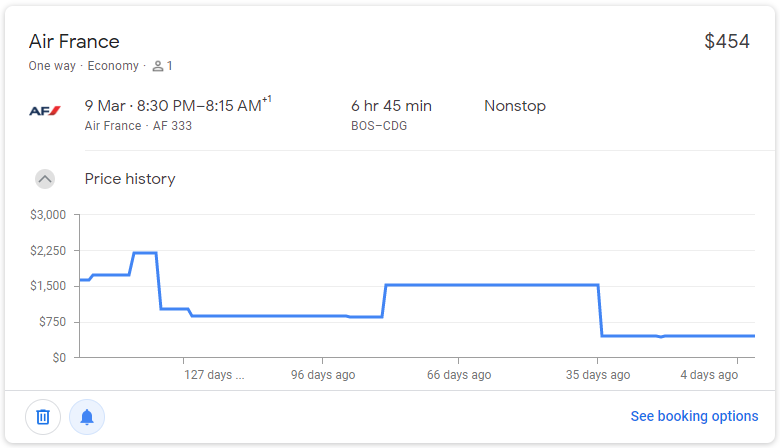
Tracking flight prices pays off because airfares move constantly. Airlines use dynamic pricing that responds to demand, load factors, and seat inventory, and third-party sites and OTAs feed into that motion. A fare tracker watches price history, displays trend charts, and sends fare alerts when rates fall below your target. Want a cheaper ticket without spending all day on a browser?
Price trackers pull fares from airline sites, global distribution systems, and aggregator APIs. They store price history, run fare prediction models, and compare options across carriers. Key features to watch include fare calendar views, price watch rules, push notifications, and the ability to track one-way and multi-city itineraries. Some tools include refund and change fee notes while others only monitor base fares, so check what the alert actually covers.
Create alerts for specific dates and for nearby days or airports. Use fare calendar tools to spot cheaper weekdays or alternate airports. Set a target price and a threshold for notifications to avoid unnecessary alerts. Track both nonstop and connecting options, and watch separate legs if a mix and match saves money. Clear cookies or use private browsing when comparing final checkout prices to avoid surprises.
For domestic travel, watch fares starting eight to 12 weeks out and tighten tracking in the final three to four weeks. For international trips, start monitoring several months in advance and prepare earlier for peak season. Fare prediction signals can guide you, but they do not guarantee the future. If a tracked fare drops sharply and meets your preset threshold, act quickly because availability often shifts.
A low headline fare can hide baggage fees, seat charges, or restrictive change rules. Price tracking reports the ticket price or total price, depending on the tool, so confirm the full cost at checkout. Pay attention to fare classes; the cheapest seats may not allow changes or refunds. Does the alert show refundable versus non-refundable fares?
No single airfare tracker sees every inventory feed. Use a mix of flight search engines, dedicated fare alerts, and airline apps. Cross-check fares on the airline site before purchase, and consider booking directly when the airline offers equal or better terms. Want the least friction? Keep screenshots of the fare and the alert for proof if the price shifts during checkout.
Frequent travelers and agencies benefit from API access, bulk fare monitoring, and automated price reconciliation. Commercial fare monitoring tools ingest GDS and OTA feeds, generate alerts by route or fare class, and integrate with booking systems to repricing offers. If you rely on volume deals, set up automated thresholds and tie alerts to booking workflows.

Autopilot automatically monitors your premium cabin and business travel for price drops, securing instant credits when airlines lower fares, while you focus on what matters most. For frequent flyers who book 2+ flights monthly, this is not just convenience; it is money back in your pocket without lifting a finger. Join thousands of business travelers who have recovered hundreds on flights they thought were final purchases.
Autopilot runs continuous price monitoring across airlines and ticketing sources. It uses automated price tracking and fare alerts to spot fare drops, then triggers ticket price alerts and airline claims. The system checks ticket rules, finds refund or reprice windows, and files for airfare credits or fare recredit automatically. What would typically take hours of manual fare tracking happens in seconds.
When Autopilot detects a lower fare, it evaluates eligibility for a refund or credit, prepares the paperwork, and submits the claim to the airline. That can mean flight reprice adjustments, airline credits applied to your account, or refund recovery when rules allow. You get notified only when the action completes, with a clear breakdown of the credit, reason, and how it will appear on your account.
Do you book business class or premium cabin seats regularly? Frequent flyers who buy two or more tickets a month recover the most value from automated fare monitoring. Travel managers and procurement teams cut unmanaged ticket spend and reduce manual fare tracking work. Road warriors keep flying and leave price watch and ticket price protection to the system.
Customers report recovered airfare credits and consistent performance across carriers. Autopilot captures fare drop history, shows past claims, and provides a return on investment snapshot for corporate travel budgets. The platform logs fare alert timestamps and claim outcomes so you can audit every airfare tracking event.
Autopilot connects to booking channels via secure APIs and encrypted credentials. It stores only the data required to manage claims and follows best practices for sensitive travel information. The service integrates with corporate travel tools, expense systems, and booking platforms so credits and refunds land in the right place without extra reconciliation work.
Sign up, link your booking email or travel tool, and set preferences for cabin type and accounts to monitor. Autopilot creates a live fare watch for each ticket and shows status updates as price monitoring and refund recovery proceed. Alerts arrive with clear actions taken and credit amounts, so you can review without digging through airlines or credit card statements. Want to keep control or hand everything off? You choose the level of automation.
How fast are credits applied? That varies by airline and ticket rules, but Autopilot files claims immediately after detecting an eligible drop and tracks progress until resolution. Can it handle corporate travel policies? Yes, you can set rules for which bookings to monitor and how to route recovered credits. What about refundable tickets or complex itineraries? The system parses fare classes and ticket conditions to determine the correct remedy, whether reprice, refund, or voucher.
Start earning automatic flight credits today.

